

Lumos Agentic AI Chat
Kubit Agentic Chat is our new AI-powered conversational analytics experience.
Instead of building reports manually, users can simply ask questions in natural language and our AI agents work together to analyze data, find patterns, detect anomalies, and deliver insights. In this experience you will see a chat like interface with the ability to:
- Ask your questions and get a report or cohort built using natural language
- Iterate on your reports to further refine or add additional options
- Get clarity on report types, Kubit functionality and more
Ask our Agents
You can access Ask Lumos Agentic AI in the following ways:
From the Home Screen you will see a chat input in the upper right corner. Simply type your question there and you will be dropped into our Ask Lumos Agents Chat experience.
Or click "Agents" on the side navigation:
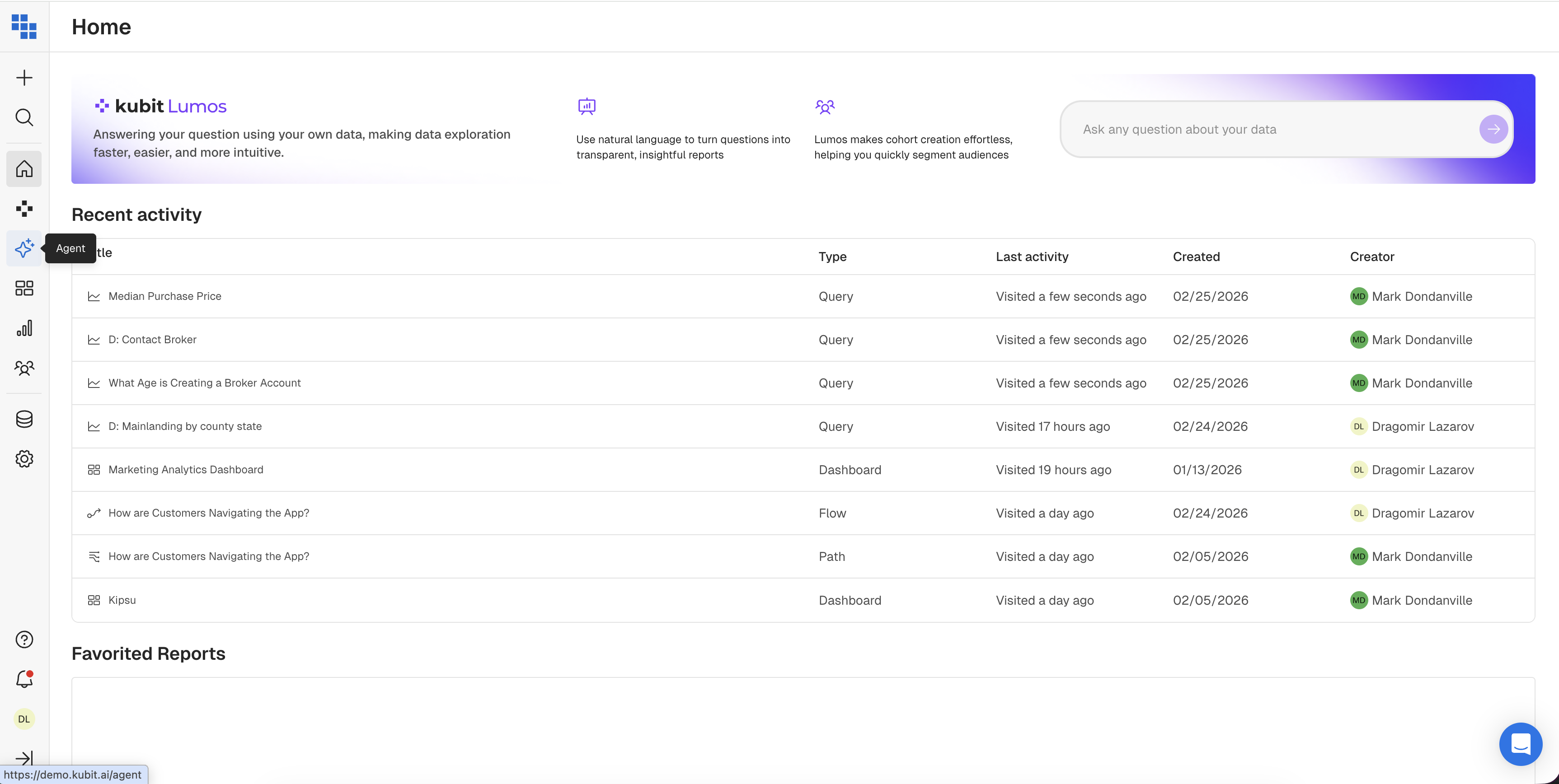
Once you've landed you can type in your question, use case, or report definition in the "Ask question" box at the bottom. Make sure you select the Schema from which Agents should refer to.
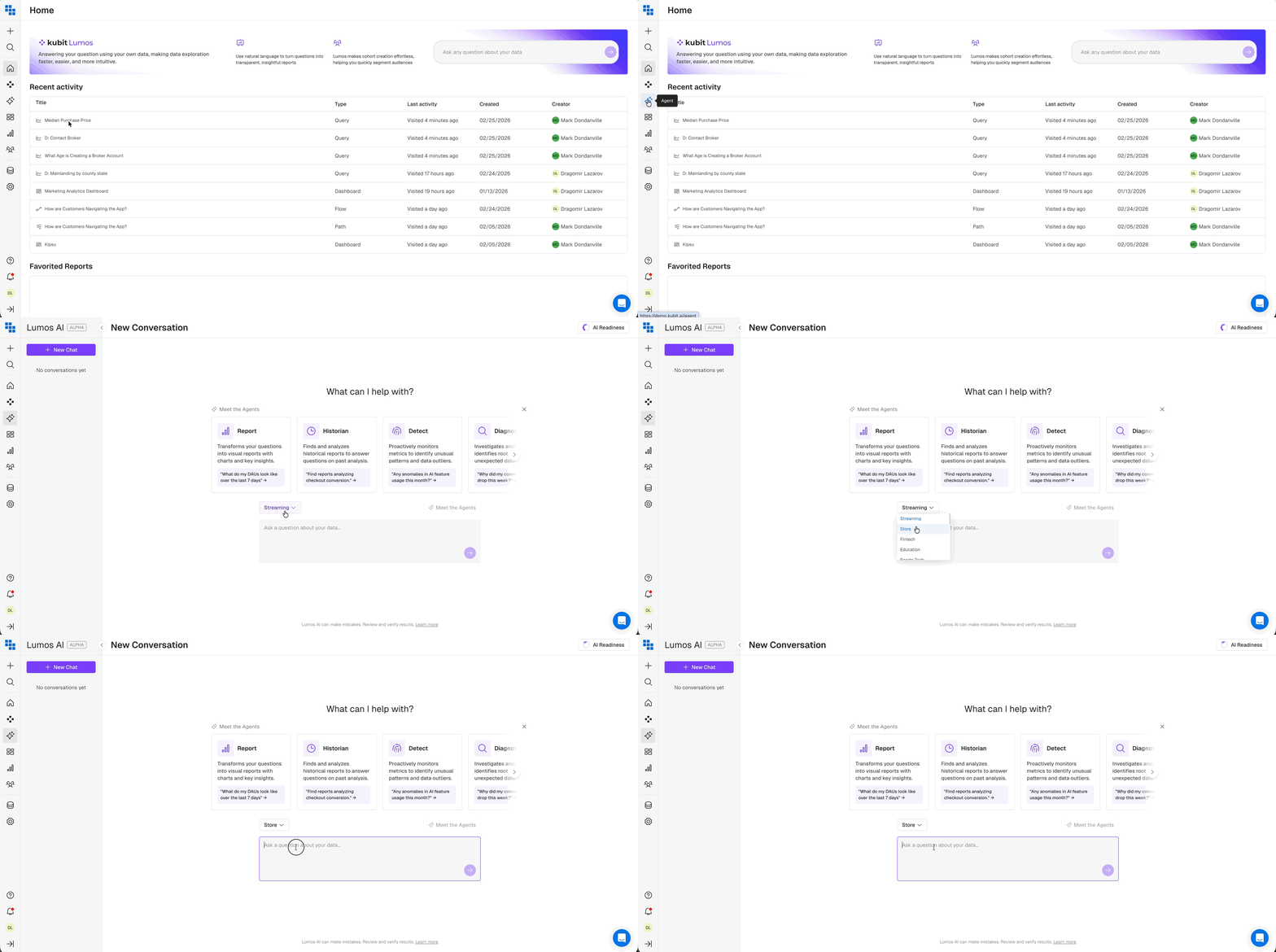
Meet the Agents
Report Agent
What it does: Creates and analyzes reports on demand, identifies key items to focus on, and surfaces potential issues.
How to describe it: "Just ask a question about your data, and ReportAgent will build the analysis for you. It doesn't just return numbers—it highlights what's important."
Example prompts:
"What do purchases look like in CA vs. US on iOS devices over the last 30 days?"
"Show me daily active users by platform for the past week"
"Compare conversion rates between new and returning users this month"
Historian Agent
What it does: Searches for existing reports or finds reports similar to your current analysis. Returns the top 5 most relevant/similar reports with brief descriptions and key insights from each.
How to describe it: "Before building something from scratch, Historian can find existing work that's already been done. It's like having perfect memory of every report ever created."
Example prompts:
"Find me reports related to subscription conversion"
"Find me similar reports" (when viewing an existing report)
"What reports exist about user retention?"
Detect Agent
What it does: Identifies anomalies or outliers in time series data. Runs full AI detection and leverages previously cached reports to gather enough historical data for valid anomaly detection.
How to describe it: "Detect scans your data for anything unusual—spikes, drops, or patterns that don't fit. A lightweight anomaly detection runs after each report is generated. You can then run the full AI detection if to confirm you have an anomaly. “
Example prompts:
"Are there any anomalies in this data?"
"Is there an issue with the data?"
"Run anomaly detection on my DAU report"
Diagnose Agent
What it does: Investigates why an anomaly or spike is happening. It probes your data across multiple dimensions to find the root cause.
How to describe it: "When you see something weird in your data, Diagnose figures out why. It automatically investigates multiple dimensions and drills down until it finds the answer."
Example prompts:
"Why are stream starts decreasing?"
"What's causing this spike?"
"Investigate this drop"
Narrative Agent
What it does: Summarizes everything discovered during the chat session. Gathers and synthesizes all findings into a nice overview.
How to describe it: "At any point, you can ask Narrative to summarize what we've found. It pulls together all the insights from your session into a cohesive story."
Example prompts:
"Summarize my findings"
"Give me an overview on what we discovered"
"Create a summary of this analysis"
Timeline & Decision Tree
Timeline
A chronological view of your workflow — what is being asked, what agents ran, what was found. It also include timestamp to help you navigate when interaction with Lumos Agents was conducted, in case you come back to the Chat conversation few days later.
You can navigate to the Timeline by expanding the right hand side navigation panel.
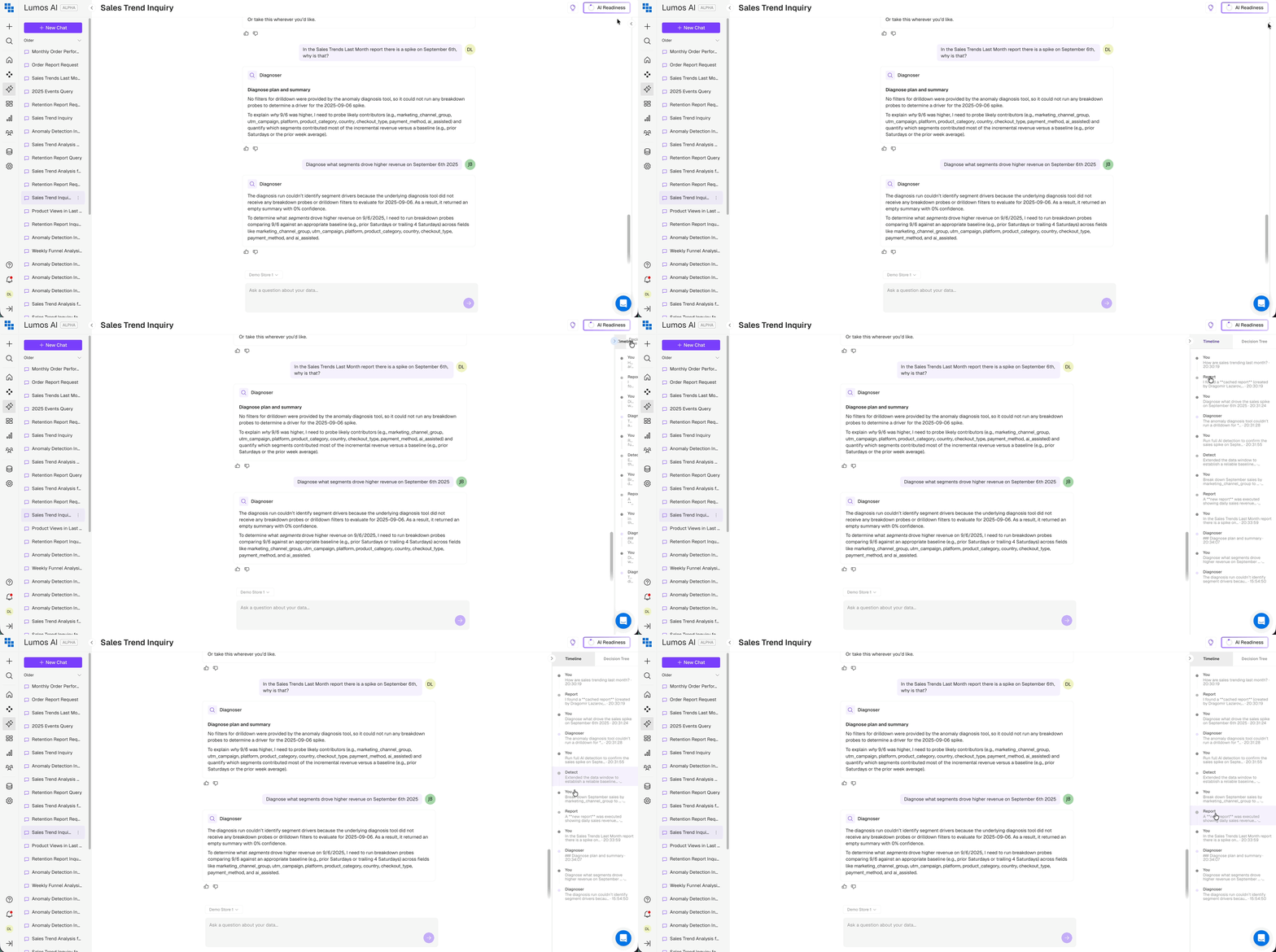
At any point you can click on the Timeline key-points and the system will scroll you to the designate part of the conversation.
Decision Tree
A visual mini-map showing the branching paths of investigation (especially useful during Diagnose flows)
You can navigate to the Decision Tree by expanding the right hand side navigation panel.
The Decision Tree shows you which agents are being executed and the decisions being made throughout the chat conversation with Lumos Agentic AI.
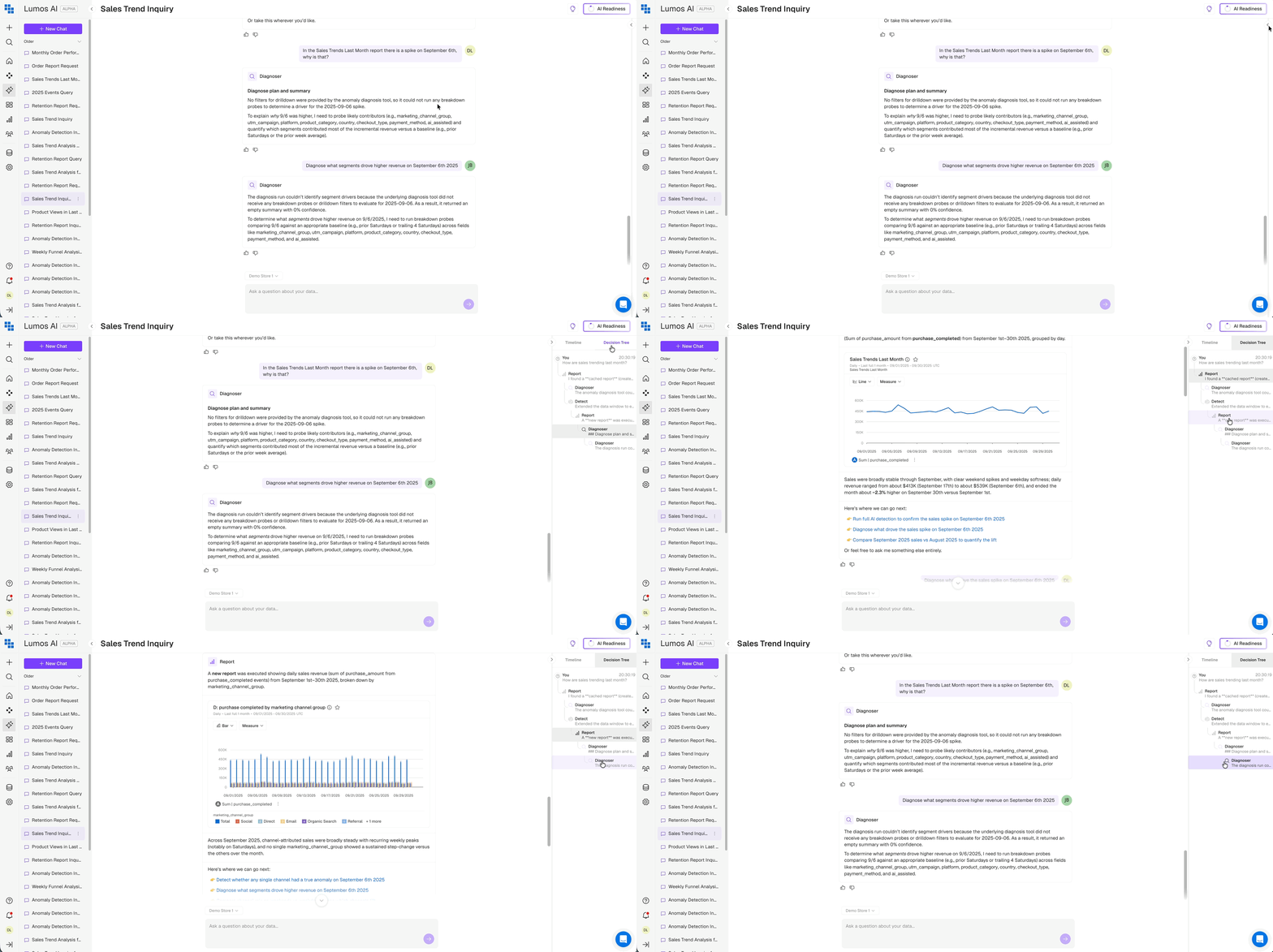
Depending if you stay on the same topic with the Agents or not, Lumos builds out a new section to the decision tree:
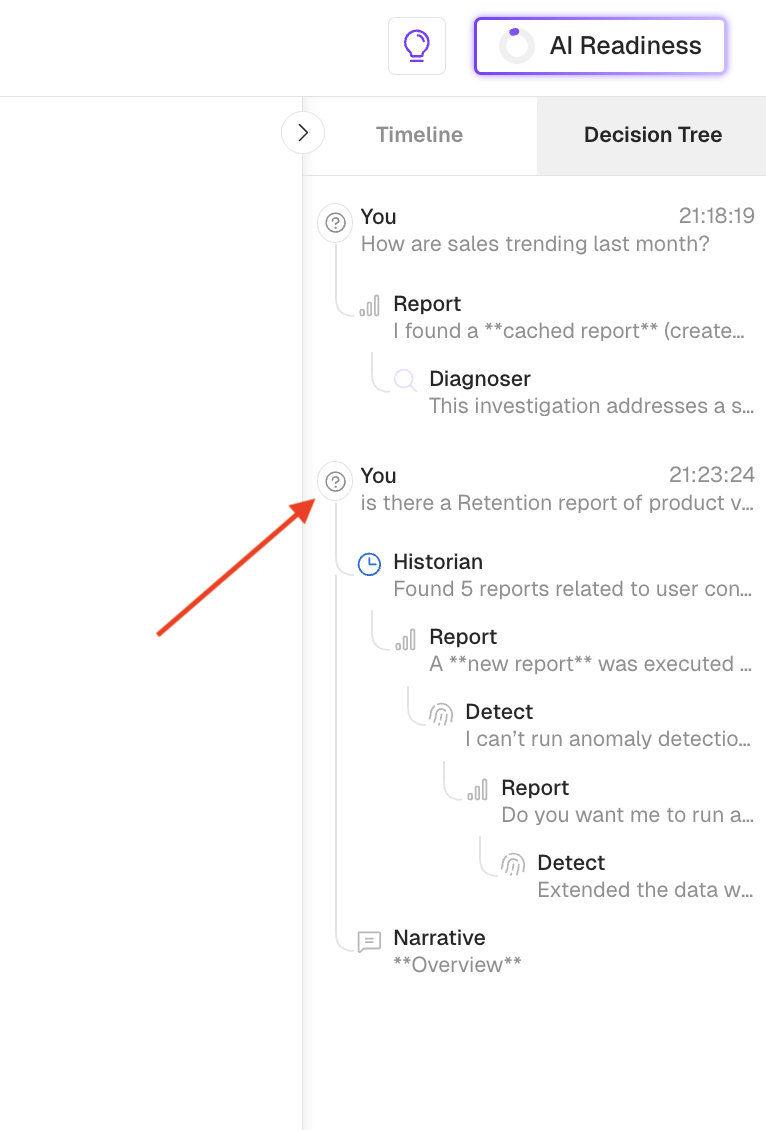
At any point you can click on the Decision Tree key-points and the system will scroll you to the designate part of the conversation.
Quick Reference: Agent Summary
Please see below summary elaborating what types of key-words can trigger different types of Agents.
| Agent | Purpose | Trigger Phrases |
|---|---|---|
| Report | Create & analyze reports | "Show me...", "What do... look like...", "Compare..." |
| Historian | Find existing/similar reports | "Find reports about...", "Find similar reports" |
| Detect | Find anomalies | "Are there anomalies?", "Is there an issue?" (also runs automatically) |
| Diagnose | Root cause analysis | "Why is...?", "What's causing...?", "Investigate..." |
| Narrative | Summarize findings | "Summarize...", "Give me a report..." |
Updated 7 months ago